NYSOH Mobile Upload
- 4.8
- Rating
- 100.00K
- Installs
- Free
- Price
 Analysis by App-foxy
When health-plan paperwork is waiting on you, the hardest part is often not choosing a plan but getting the right documents to the right place. NYSOH Mobile Upload is built for that narrow job: it lets users upload documents to the New York State of Health marketplace. I see it as a focused medical-category app rather than a general health companion, and that distinction matters. It is not trying to replace a doctor, explain symptoms, or manage appointments. Its purpose is administrative, and its usefulness depends on whether you need to submit paperwork through NYSOH.
After using it, my overall impression is that the app makes sense for a specific moment in the insurance process. If NYSOH has asked you for proof or supporting documents, having a mobile route can be more practical than moving files between a phone and a computer. If you are not dealing with a New York State of Health request, however, there is little reason to keep it in your toolkit. This is a task-specific upload tool, not a complete healthcare app.
What NYSOH Mobile Upload is really for
The app comes from MAXIMUS and carries the short label “NYSOH Mobile.” Its central role is straightforward: upload documents to the NYSOH health-plan marketplace. That sounds simple, but document submission is one of those chores where convenience depends on the details around the upload. You need the correct file, a readable image, the right account or case context, and enough confidence that the submission went where it should.
You May Also Like

 Blood Strike: 2.5 Anniversary
Blood Strike’s Loadouts Turn Every Drop Into a Tactical Gamble
A close look at Blood Strike’s custom loadouts: how fast access to signature weapons reshapes its battle royale rhythm, rewards preparation, and narrows the gap between fights.

 Pandora - Music & Podcasts
Pandora’s Music Is Easy to Start, but Harder to Recover
Pandora’s strength is its low-effort path from a seed to a station. Its weak spot is how much confidence it asks you to place in connection, setup, and quiet recovery.

 8 Ball Pool
 Is Built on Rivalries, Rematches, and Routine
A close look at the rivalries, rematches, shared routines, and unanswered safety questions that turn a quick pool match into a persistent mobile community.

 Samsung Music
’s Quiet Strength Is Playing What You Already Own
Its reach comes less from spectacle than from dependable access to a personal library. That simplicity is both the app’s strongest retention engine and its ceiling.

 AccuWeather: Weather Radar
AccuWeather Review: A Quick, Clear Forecast for Everyday Decisions
For everyday plans, the best forecast is the one you can understand quickly. AccuWeather makes rain timing, radar, and local conditions easy to act on, with a few trade-offs.

 Hill Climb Racing
Why Hill Climb Racing Still Turns Crashes Into One More Run
A tiny car, a bumpy hill and one more upgrade: Hill Climb Racing keeps resurfacing because its simple chaos makes every near-miss feel personal.
More From Our News Desk



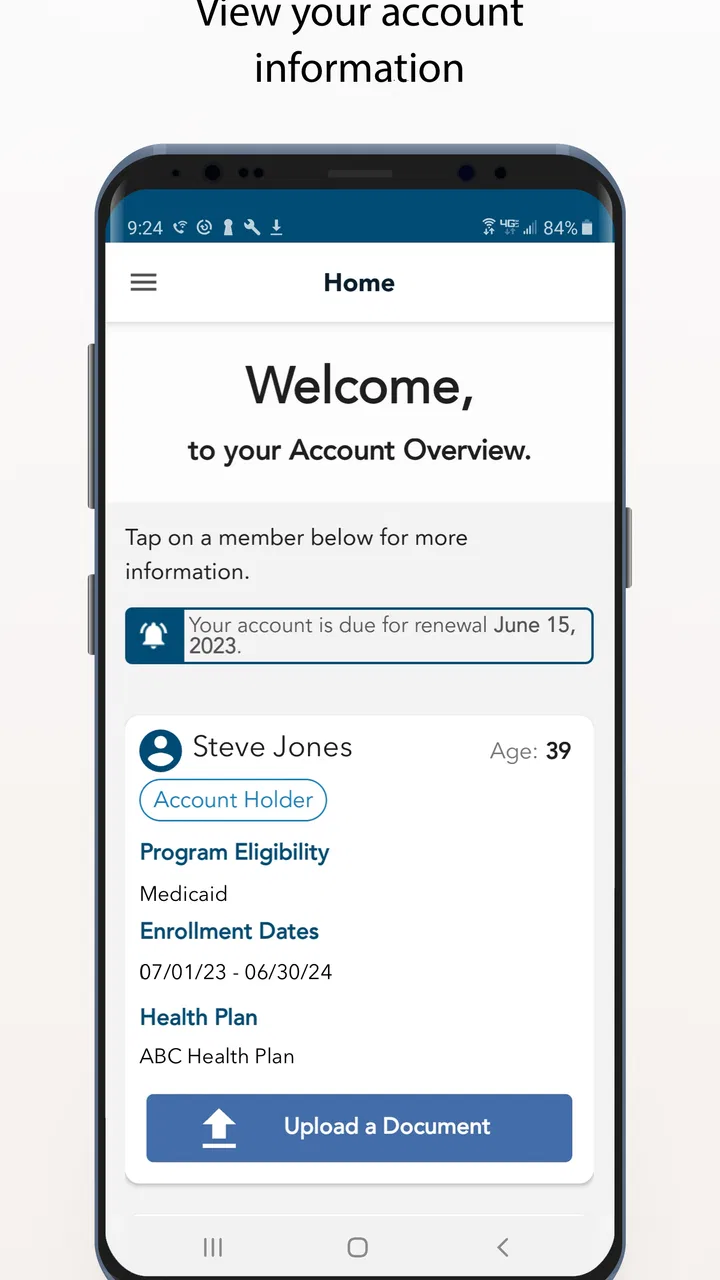
I would describe it as a companion to an existing marketplace process. It does not replace the broader work of applying for coverage, comparing plans, understanding eligibility, or deciding which insurance option suits your household. Instead, it addresses the evidence-gathering stage that can arrive after an application or renewal. That makes it most relevant to applicants, household members, or helpers who have been asked to provide paperwork.
The app is free, which is important in this category. There is no purchase decision involved before trying it, so its value is measured in saved effort rather than entertainment or a collection of premium tools. Free access does not automatically make an app useful, though. The practical question is whether it reduces friction compared with sending documents another way.
Its audience is also clear from its Everyone content rating. That does not mean every person will need it; it means the app is presented for general audiences rather than being restricted to a particular age group. The minimum operating-system requirement is Android 8.0, so people using older Android phones may need to check compatibility before relying on it for a deadline.
A practical document-submission scenario
Imagine that I am completing a NYSOH application for a family member and receive a request for proof of income or identity. The document is already saved as a PDF on my phone, or I can photograph the paper in good light. Instead of emailing it to myself, locating a desktop computer, signing in there, and navigating the marketplace from a larger screen, I can use the mobile upload route while the paperwork is in front of me.
The useful workflow is not simply “take a picture and tap send.” I would first create a small folder on the phone containing only the files intended for this case. I would rename them in plain language, such as “income document” or “identity document,” so I do not accidentally choose a similar-looking scan. Before submitting, I would zoom in on each image and check that names, dates, and numbers are readable. A fast upload of an unreadable page does not solve the request.
That preparation is one of the less obvious parts of using a document app well. Mobile cameras make it easy to capture paperwork, but shadows, folded corners, glare, and cropped edges can turn a technically successful upload into a practical failure. I would place the page on a flat surface, use even lighting, and capture the entire sheet. If the paperwork has several pages, I would keep the pages together and check their order before sending them.
For someone helping a parent or relative, the phone-based approach can also reduce handoffs. A trusted helper may already have the documents as photos or scans and can assist with the upload while the applicant remains involved in the account process. I would still keep the applicant’s case details and personal information private, and I would avoid leaving sensitive files in a shared photo folder longer than necessary.
Where the free access provides real value
The strongest value here is convenience at the exact point when a document request interrupts an application. A free app that removes the need for a scanner, a printer, or a separate computer can be worthwhile even if it performs only one job. That is especially true for people who do most of their online tasks from a phone.
It can also help when the original document is physical. A user may not have a scanner at home, but a phone camera is usually close at hand. Turning a paper into a careful, readable image can make the submission process more accessible. I would not call that a guarantee that every document will be accepted, but it is a meaningful practical advantage over workflows that assume access to office equipment.
Another benefit is separation of purpose. Because this is not a general-purpose file-sharing service, I would be less likely to confuse a health-marketplace upload with an unrelated email attachment or a message sent to the wrong recipient. The focused destination gives the task a clearer boundary. That said, focus also means the app is not useful for submitting paperwork to an employer, a hospital, a tax office, or another insurance provider.
The app’s audience size suggests that it is not an obscure experiment: it has passed one hundred thousand installs, with an average rating of 4.8 from roughly twelve thousand ratings. Those figures suggest a broadly positive reception, but I would treat them as context rather than a promise. An upload app can work well for one person’s document request and still feel limited to someone expecting a full account-management experience.
It has been available since October 2019 and is currently at version 3.0. That gives the app a longer presence than a newly launched utility, while the version number alone should not be mistaken for a guarantee about every device or workflow. What matters to me is whether it handles the particular submission I need without making me repeat steps or wonder whether the file arrived.
The tradeoffs I noticed before relying on it
The first tradeoff is scope. The app’s narrow purpose is its main strength, but it also creates the clearest limitation. If I need to research plans, update every part of an application, or resolve an eligibility question, I would expect to use the broader NYSOH service or contact the appropriate support channel instead. I would not install this expecting a dashboard for all health-insurance tasks.
The second tradeoff is the difference between an upload and a completed case. Sending a document does not necessarily mean the marketplace has reviewed it, accepted it, or finished the request. I would save the original files, note what I submitted, and keep any confirmation information shown during the process. If a deadline matters, I would not assume that tapping the upload button ends my responsibility.
This is also why I would avoid submitting a rushed photograph. A mobile camera is convenient, but convenience can encourage careless capture. A page with tiny text may look fine in the camera preview and become difficult to read after upload. Multi-page documents create another risk: leaving out a page, mixing pages from different requests, or uploading an outdated version.
There is a privacy tradeoff as well. Health-plan documents can contain highly sensitive personal information. A phone is convenient, but it is also easy to lose, share, or leave unlocked. I would use the app only on a device I control, avoid public Wi-Fi when practical, and remove unnecessary duplicate images after confirming that I still have a secure copy. These are sensible habits for any health-document workflow, not special claims about the app’s internal handling.
The phone screen is another limitation compared with a desktop browser. Reviewing a long PDF, checking multiple pages, and comparing names or dates can be tiring on a small display. For a single clear document, mobile is attractive. For a complicated packet, I would prepare the files on a computer if possible and use the phone only when that is genuinely easier.
How it compares with the usual alternatives
The most obvious alternative is using the NYSOH website from a computer. A browser can be better when I need to read instructions, move between several application sections, or manage many files. The larger screen makes it easier to verify that I am working in the correct account and to inspect document details. The mobile app becomes more compelling when the files are already on my phone or when I am working from paper without access to a scanner.
Email is another familiar alternative, but I would not treat ordinary email as interchangeable with a purpose-built marketplace upload. Email can create uncertainty about the correct destination, subject line, attachment limits, and whether the message is connected to the right application. It also encourages people to keep sensitive documents in inboxes and sent folders. A direct upload route is more appropriate when the marketplace has specifically asked for documents through its own process.
A scanner or multifunction printer can produce cleaner files, especially for small print, faded pages, or large packets. If I already have that equipment, scanning may be the better choice. The app does not make a poor original document clearer. Its advantage is accessibility and immediacy, not professional scanning quality.
General cloud-storage apps can help organize files, but they are not a substitute for submitting them to NYSOH. They may be useful during preparation, particularly when a family member needs to share a document with the person completing the application. I would use them as a temporary staging area, then submit through the appropriate marketplace route rather than treating a shared folder as proof of delivery.
In short, I would choose the mobile app for a focused upload from a phone, the website for broader account work, and a scanner for demanding document quality. That is a more useful comparison than calling one option universally best. The right choice depends on whether the bottleneck is access, organization, readability, or account management.
Who is most likely to benefit
I think NYSOH Mobile Upload is a good fit for a New York resident who has an active document request connected to the NYSOH marketplace and prefers handling paperwork on Android. It is also useful for someone who receives documents as phone photos or PDFs and wants to avoid transferring them to another device before submission.
It may suit a family organizer who manages paperwork for a household, provided that person has the appropriate authorization and keeps the documents secure. The app can shorten the distance between “the document is in my hand” and “the document is ready to submit.” That is a modest benefit, but during an application deadline, modest reductions in friction can matter.
I would be more cautious about recommending it to someone who has not been asked to upload anything. Installing it in advance may not provide much benefit, because the app is not a general medical record, appointment, or insurance-comparison tool. I would also steer a user toward the website or another route if the task involves extensive account changes, complicated instructions, or many documents that are easier to inspect on a larger screen.
People using Android below version 8.0 should not build a time-sensitive plan around it without first confirming that their device can run the app. Likewise, anyone uncomfortable photographing or storing sensitive paperwork on a phone may prefer a computer and scanner, even if that process takes longer. Free access is helpful, but it does not remove those practical and privacy considerations.
Small habits that make the app more dependable
I would prepare before opening the upload screen. Gather the requested pages, compare them with the marketplace notice, and separate current documents from old ones. This prevents the common mistake of choosing the first file with a familiar name. If I am photographing pages, I would capture them one at a time and review the result immediately rather than waiting until the entire packet is finished.
I would also keep a simple submission record: the document name, the date I sent it, and any confirmation displayed by the process. That record is useful if I need to follow up, because it turns a vague memory into a clear account of what was submitted. I would not delete the originals until I was satisfied that I can retrieve them securely.
For a multi-page packet, I would use a consistent naming pattern and check the sequence. For example, I might label pages as page one, page two, and page three, while keeping the document type in the name. This is not a special feature claim; it is a workflow choice that reduces avoidable mistakes when the phone contains many similar images.
Finally, I would read the final screen carefully. An upload that appears to finish may still require a confirmation step or may show a message that needs attention. I would not close the app immediately after selecting a file. Spending a few extra seconds checking the result is preferable to discovering later that the wrong page was sent or the process was interrupted.
My verdict on whether it is worth using
For the right user, I would recommend trying it. The app is free, focused, and aimed at a real administrative problem: getting documents to the NYSOH health-plan marketplace from a mobile device. Its value is strongest when I have the paperwork on my phone or in front of me and do not want to depend on a scanner or desktop computer.
I would not recommend it as a replacement for the full NYSOH experience, and I would not choose it when a large screen or high-quality scan is clearly more suitable. Its best use is narrower: prepare carefully, upload the requested material, check the result, and retain a secure copy. That honest limitation is also what makes the app easy to understand.
With an average of 4.8 and more than one hundred thousand installs, it has signs of being useful to a substantial audience, while my decision would still depend on the specific document task. The Everyone rating makes it broadly approachable, and Android 8.0 support sets a clear basic compatibility point. If you are handling an NYSOH document request on a compatible Android phone, I would choose this free, purpose-built route before relying on improvised email or a last-minute transfer to another device.
My final advice is simple: use it when mobile submission is the problem you need to solve, not because you expect a complete insurance-management app. For that single job, it can save time and equipment. Outside the NYSOH document-upload situation, I would skip it and use a tool designed for the task you actually have.
FAQs for NYSOH Mobile Upload
01What is the NYSOH Mobile Upload app used for?
The NYSOH Mobile Upload app is designed to simplify the process of submitting documents required for health insurance applications through the New York State of Health marketplace. Users can easily capture and upload images of necessary documents directly from their mobile devices, ensuring a faster and more efficient application process.
02Is the NYSOH Mobile Upload app secure for submitting documents?
Yes, the NYSOH Mobile Upload app is designed with security in mind. It uses encryption and other protective measures to ensure that your personal information and documents are securely transmitted and stored. Always ensure you're using the official app to prevent any security risks.
03How do I upload documents using the NYSOH Mobile Upload app?
To upload documents, first log in to your NYSOH account using the app. Then, follow the prompts to capture images of your documents. Ensure that the images are clear and legible. After capturing, you can review and submit them directly through the app, receiving confirmation once the upload is successful.
04Can I track the status of my document submissions through the app?
Yes, the NYSOH Mobile Upload app allows you to track the status of your document submissions. After uploading, you can check for updates to see if your documents have been reviewed or if additional information is required. This feature helps keep you informed about your application progress.
05What types of documents can I upload with the NYSOH Mobile Upload app?
The NYSOH Mobile Upload app supports a variety of document types required for health insurance applications. This includes proof of income, identity verification, and residency documents. Ensure your documents meet the format and quality requirements specified in the app for a successful upload.
Pros
- Easy photo upload for documents.
- Secure login with face recognition.
- User-friendly interface design.
- Quick access to application status.
- Supports multiple file formats.
Cons
- Limited support for older devices.
- Occasional app crashes reported.
- No offline functionality available.
- Requires stable internet connection.
- Limited language support.

NYSOH Mobile Upload
Gallery